网络自动化运维 Help

7-2 Telemetry遥测

介绍

遥测: 是指传感器在测量现场收集测量对象的数据后,数据通过无线传输(例如无线电、超声波或红外线)、电话或计算机网络、简讯和GSM等各种方式传送至远距离的接收设备以供监测人员监测。

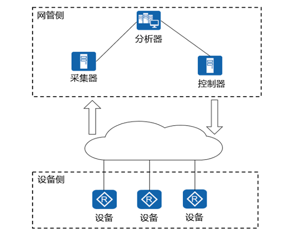
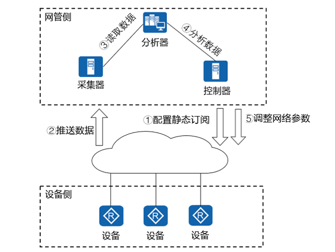
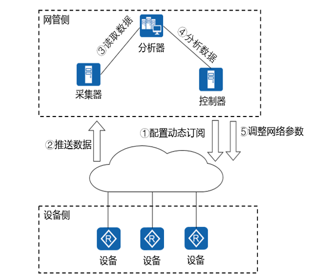
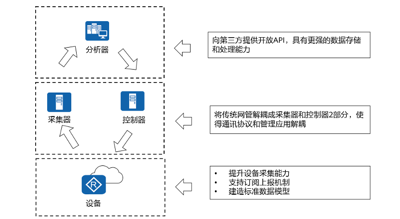
Network Telemetry(/təˈlemətri/)网络遥测技术: 是一项远程的从物理设备或虚拟设备上高速采集数据的技术。设备通过推模式周期性的主动向采集器上送设备的接口流量统计、CPU或内存数据等信息, 相对传统拉模式的一问一答式交互,提供了更实时更高速的数据采集功能。优势有:

  • 采集数据的精度高,且类型十分丰富,可以充分反映网络状况。

  • 在复杂的网络中,能够快速地定位故障,达到秒级,甚至亚秒级的故障定位速度。

  • 仅需配置一次订阅,设备就可以持续上报数据,减轻了设备处理查询请求的压力

7 2telemetry

7 2telemetry 2

框架架构

7 2telemetry 3

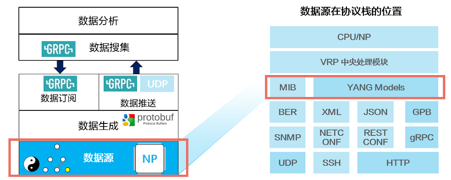
数据源

7 2telemetry 4

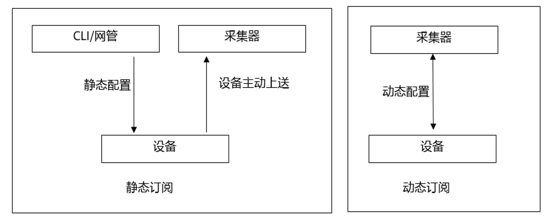
订阅模式:主动订阅与被动订阅。静态订阅即设备端主动推送数据,适合长期监控。动态订阅适合临时尝试。

7 2 1

7 2 2

7 2 3

采样数据

采样路径:linux系统的哲学是一切皆文件,访问cpu使用率要访问系统路径 huawei-debug:debug/cpu-infos/cpu-info

采样周期

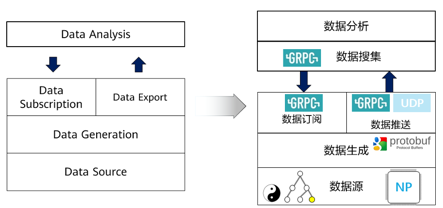
GBP编码:在设备和采集器之间传输数据时,需要对数据进行编码,当前支持2种编码格式即Google协议缓冲(Google Protocol Buffer,GPB)编码格式和JSON编码格式。文件后缀.proto,与XML、JSON相似只是采用二进制编码性能更好。

Proto文件:用于定义GPB编码的编码规则。Telemetry利用GPB编码格式(文件扩展名为.proto)提供一种灵活、高效、自动序列化结构数据的机制,GPB属于二进制编码格式,性能好、效率高。

gRPC协议:Telemetry通过gRPC协议将经过编码格式封装的数据上报给采集器进行存储。gRPC协议是Google发布的开源RPC框架,是基于HTTP/2协议的、高性能的、通用的软件框架。通信双方都基于该框架进行二次开发,从而使得通信双方聚焦在业务,无须关注由gRPC软件框架实现的底层通信。

实验-被动订阅获取设备侧CPU数据

7 2
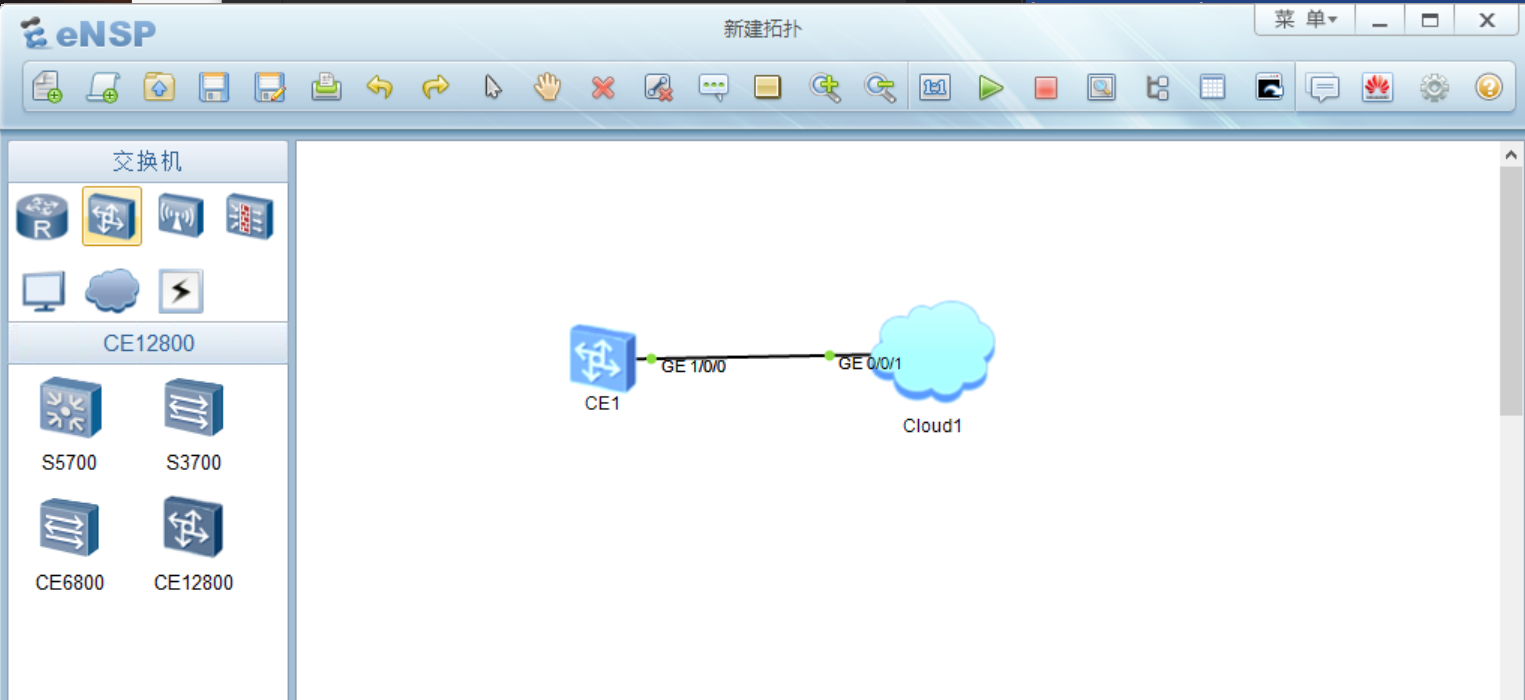
  • 设备侧:CE12800 192.168.56.100

  • 采集器:Cloud 192.168.56.1:10001

  • 分析器:物理机Python代码

服务端设备侧

导入CE12800设备镜像包(老师下发镜像至学生机),启动CE12800,配置与物理机互通。

<HUAWEI>system-view immediately # 缩写 sy im [HUAWEI]interface GE1/0/0 # CE12800的第一个GE口是1/0/0,可以display interface brief确认。 [HUAWEI-GE1/0/0]undo portswitch # 交换机配ip可以配在vlanif1上,也可以把GE口转3层,eNSP上的S5700功能不全不支持转3层这种方式。 [HUAWEI-GE1/0/0]ip address 192.168.56.100 24 [HUAWEI-GE1/0/0]undo shutdown # 验证 [HUAWEI-GE1/0/0]display this [HUAWEI-GE1/0/0]display ip interface brief # 确认有IP和PHY状态为UP # 测试ping中间人,即测试从服务器到物理机连通 [HUAWEI-GE1/0/0]ping 192.168.56.1 [HUAWEI-GE1/0/0]q [HUAWEI]

Windows终端下测试 物理机ping服务器设备侧

ping 192.168.56.100

telemetry配置

# 进入telemetry配置 <HUAWEI>sy im # 如果已经在配置模式中,则不需要这行。 [HUAWEI]telemetry # 创建目标组、创建目标 # 指定数据上传目标地址,即采集器,设备侧的数据推送至物理机,python客户端接收数据。 # 由于充当中间人的网卡与物理机互通,推送至192.168.56.1即推送至物理机,与SNMP trap实验类似。 # 推送至192.168.56.1 10001端口,python客户端中的连接信息应该与此保持一致。 [HUAWEI-telemetry]destination-group destination1 # 组名起名为destination1,为了好记,后面的传感器名也是英语单词加数字1。 [HUAWEI-telemetry-destination-group-destination1]ipv4-address 192.168.56.1 port 10001 protocol gRPC [HUAWEI-telemetry-subscription-subscription1]display telemetry destination destination1 # 验证 [HUAWEI-telemetry-destination-group-destination1]q # 创建传感器组、创建传感器,采样路径(一切设备皆文件思想)、过滤条件(例如cpu使用率超过40%再上报,为了降低复杂度和更容易看到数据,未配置)。 [HUAWEI-telemetry]sensor-group sensor1 # 注意刚开始的路径为[HUAWEI-telemetry] [HUAWEI-telemetry-sensor-group-sensor1]display telemetry sensor-path # (可选)查看传感器路径或课本p107页 [HUAWEI-telemetry-sensor-group-sensor1]sensor-path huawei-devm:devm/cpuInfos/cpuInfo [HUAWEI-telemetry-sensor-group-sensor1]display this # (可选)验证 [HUAWEI-telemetry-sensor-group-sensor1]display telemetry sensor sensor1 # (可选)验证 [HUAWEI-telemetry-sensor-group-sensor1]q # 创建订阅,绑定目标、绑定传感器,设置采样周期时间,编码(默认GPB与proto文件对应,可选xml、json) [HUAWEI-telemetry]subscription subscription1 [HUAWEI-telemetry-subscription-subscription1]destination-group destination1 [HUAWEI-telemetry-subscription-subscription1]sensor-group sensor1 sample-interval 10000 # 单位ms。不能小于display telemetry sensor-path 中的最小间隔。 [HUAWEI-telemetry-subscription-subscription1]display telemetry subscription subscription1 # 验证 [HUAWEI-telemetry-subscription-subscription1]q
The device is running! ################################################################################ ################################################################################ ################################################################################ ################################################################################ ########## <HUAWEI>sy im Enter system view, return user view with return command. [HUAWEI]int GE1/0/0 [HUAWEI-GE1/0/0]undo portswitch [HUAWEI-GE1/0/0]ip address 192.168.56.100 24 [HUAWEI]int GE1/0/0 [HUAWEI-GE1/0/0]undo shutdown [HUAWEI-GE1/0/0]dis this # interface GE1/0/0 undo portswitch undo shutdown ip address 192.168.56.100 255.255.255.0 # return [HUAWEI-GE1/0/0]dis ip int br *down: administratively down !down: FIB overload down ^down: standby (l): loopback (s): spoofing (d): Dampening Suppressed The number of interface that is UP in Physical is 3 The number of interface that is DOWN in Physical is 0 The number of interface that is UP in Protocol is 2 The number of interface that is DOWN in Protocol is 1 Interface IP Address/Mask Physical Protocol VPN GE1/0/0 192.168.56.100/24 up up -- MEth0/0/0 unassigned up down -- NULL0 unassigned up up(s) -- [HUAWEI-GE1/0/0]ping 192.168.56.1 PING 192.168.56.1: 56 data bytes, press CTRL_C to break Reply from 192.168.56.1: bytes=56 Sequence=1 ttl=128 time=2 ms Reply from 192.168.56.1: bytes=56 Sequence=2 ttl=128 time=2 ms Reply from 192.168.56.1: bytes=56 Sequence=3 ttl=128 time=2 ms Reply from 192.168.56.1: bytes=56 Sequence=4 ttl=128 time=2 ms Reply from 192.168.56.1: bytes=56 Sequence=5 ttl=128 time=2 ms --- 192.168.56.1 ping statistics --- 5 packet(s) transmitted 5 packet(s) received 0.00% packet loss round-trip min/avg/max = 2/2/2 ms [HUAWEI-GE1/0/0]q [HUAWEI]telemetry [HUAWEI-telemetry]destination-group destination1 [HUAWEI-telemetry-destination-group-destination1]ipv4-address 192.168.56.1 port 10001 protocol gRPC [HUAWEI-telemetry-destination-group-destination1]q [HUAWEI-telemetry]sensor-group sensor1 [HUAWEI-telemetry-sensor-group-sensor1]sensor-path huawei-devm:devm/cpuInfos/cpuInfo [HUAWEI-telemetry-sensor-group-sensor1]dis this # sensor-group sensor1 sensor-path huawei-devm:devm/cpuInfos/cpuInfo # return [HUAWEI-telemetry-sensor-group-sensor1]display telemetry sensor sensor1 -------------------------------------------------------------------------------- -------- Sensor-name:sensor1 1. Sensor-path : huawei-devm:devm/cpuInfos/cpuInfo Sensor-type : sample Path-state : NA Op-field : - Op-type1 : - Op-value1 : - Relation : - Op-type2 : - Op-value2 : - -------------------------------------------------------------------------------- -------- [HUAWEI-telemetry-sensor-group-sensor1]display telemetry sensor-path Sample(S) : Serial sample. Sample(P) : Parallel sample. -------------------------------------------------------------------------------- ---------------------------------- Type MinPeriod(ms) MaxEachPeriod Path -------------------------------------------------------------------------------- ---------------------------------- Sample(S) 10000 -- huawei-devm:devm/cpuInfos/cpuInfo Sample(S) 10000 -- huawei-devm:devm/memoryInfos/memoryInf o Sample(P) 100 20 huawei-ifm:ifm/interfaces/interface/if Statistics Sample(S) 100 20 huawei-ifm:interfaces/interface Sample(S) 10000 200 huawei-mac:mac/bdMacTotalNumbers/bdMac TotalNumber Sample(S) 10000 200 huawei-mac:mac/macAddrSummarys/macAddr Summary Alarm -- -- huawei-sem:hwCPUUtilizationResume Alarm -- -- huawei-sem:hwCPUUtilizationRisingAlarm Alarm -- -- huawei-sem:hwStorageUtilizationResume Alarm -- -- huawei-sem:hwStorageUtilizationRisingA larm -------------------------------------------------------------------------------- ---------------------------------- [HUAWEI-telemetry-sensor-group-sensor1]q [HUAWEI-telemetry]subscription subscription1 [HUAWEI-telemetry-subscription-subscription1]destination-group destination1 [HUAWEI-telemetry-subscription-subscription1]sensor-group sensor1 sample-interva l 5000 Warning: The sampling intervals of some XPaths have been changed. To query the m inimum sampling interval that each path supports, run the display telemetry sens or-path command. [HUAWEI-telemetry-subscription-subscription1]sensor-group sensor1 sample-interva l 10000 [HUAWEI-telemetry-subscription-subscription1]display telemetry subscription subs cription1 --------------------------------------------------------------------------- Sub-name : subscription1 Source Address : - Dscp : 0 Protocol : GRPC Encoding : GPB Send bytes : 0 Send packets : 0 Total send delay : 0 Total send error : 0 Total send drop : 12 Total other error : 0 Last send-time : 0000-00-00 00:00:00 Sensor group: ---------------------------------------------------------------------- Sensor-name Sample-interval(ms) Heart-interval(s) Suppression State ---------------------------------------------------------------------- sensor1 10000 - NO RESOLVED ---------------------------------------------------------------------- Destination group: ---------------------------------------------------------------------- Dest-name Dest-IP Dest-port State Vpn-name Protocol ---------------------------------------------------------------------- destination1192.168.56.1 10001 RESOLVED - GRPC ---------------------------------------------------------------------- Sub-state : PASSIVE --------------------------------------------------------------------------- Total subscription number is : 1 [HUAWEI-telemetry-subscription-subscription1] [HUAWEI-telemetry-subscription-subscription1] [HUAWEI-telemetry-subscription-subscription1] [HUAWEI-telemetry-subscription-subscription1]display telemetry destination desti nation1 -------------------------------------------------------------------------------- -------- Dest-name Dest-addr Dest-port State Vpn-name Protocol Istls FailedReason -------------------------------------------------------------------------------- -------- destination1192.168.56.1 10001 RESOLVED - GRPC TLS NA -------------------------------------------------------------------------------- -------- [HUAWEI-telemetry-subscription-subscription1]
准备.proto文件和生成

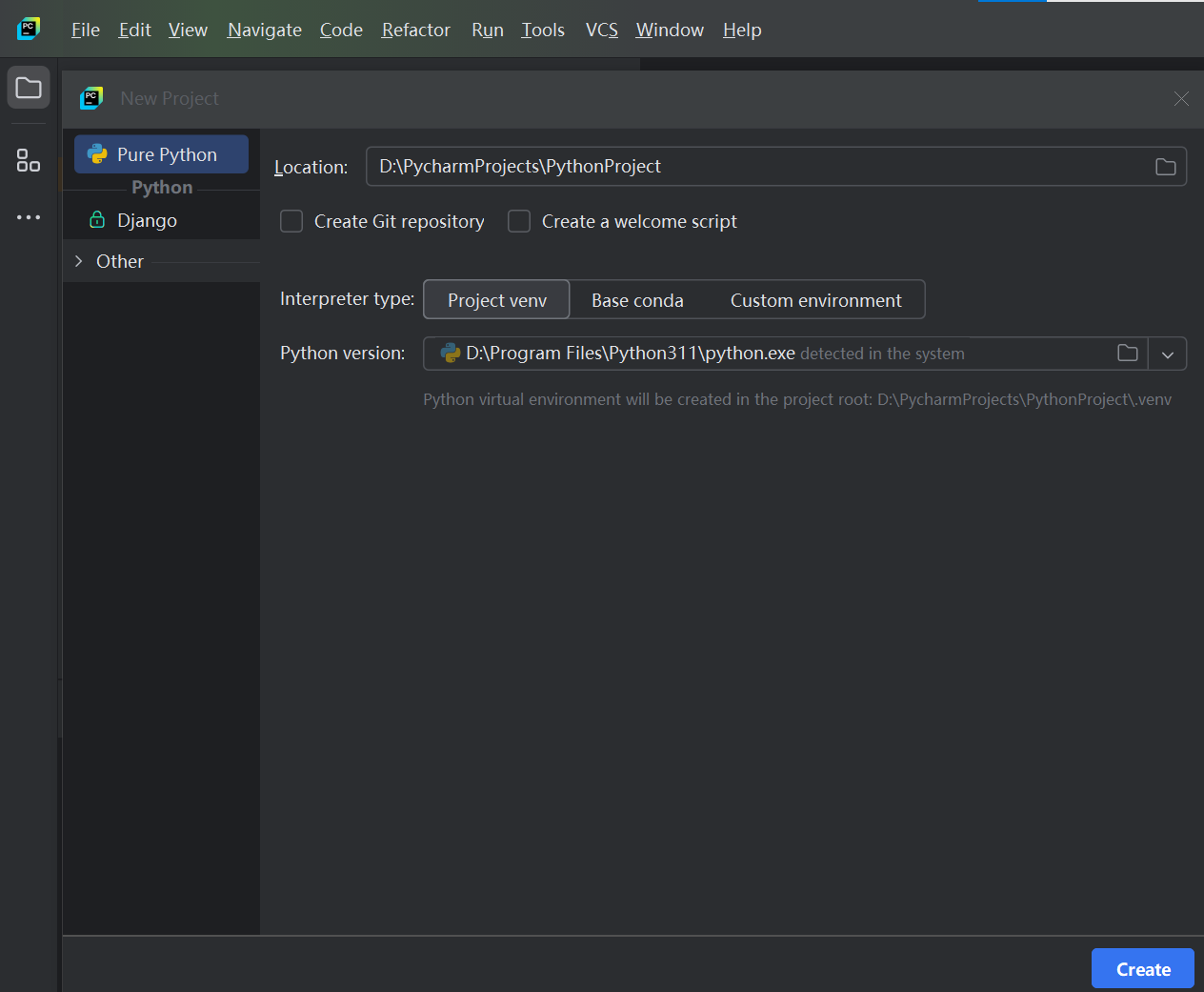
  1. (可选)一个新的python工程项目

    7 2 python

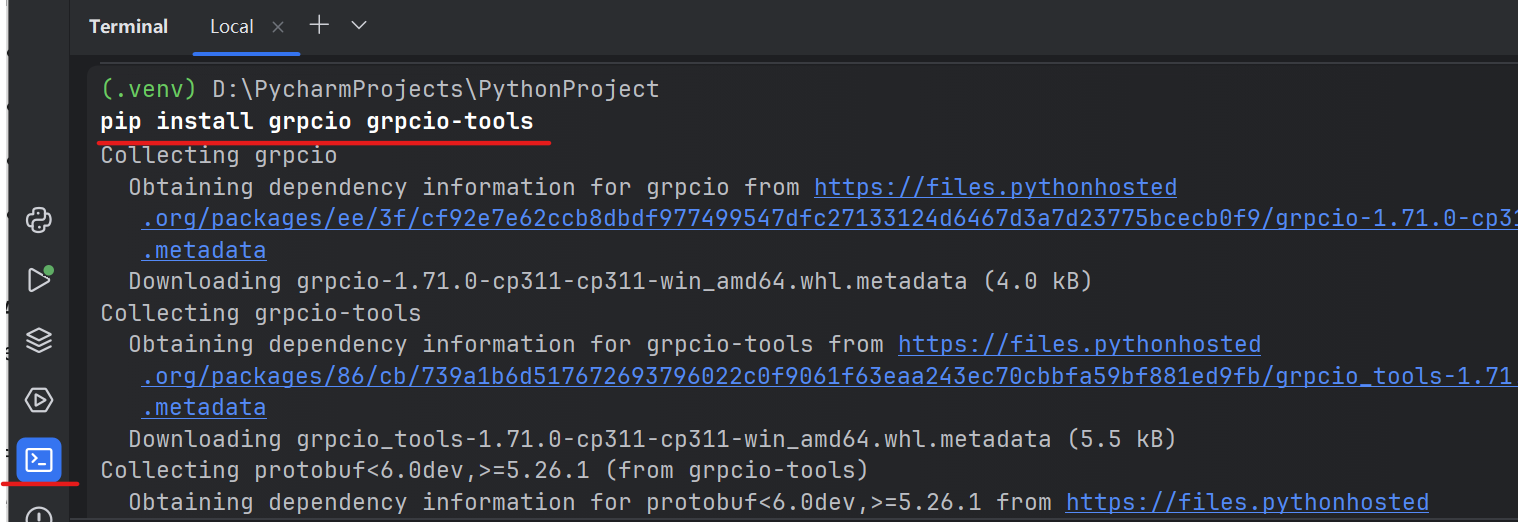
  2. 安装grpcio、grpcio-tools库

pip install grpcio grpcio-tools
pip install grpcio grpcio-tools -i http://mirrors.cloud.tencent.com/pypi/simple --trusted-host mirrors.cloud.tencent.com
7 2 grpcio
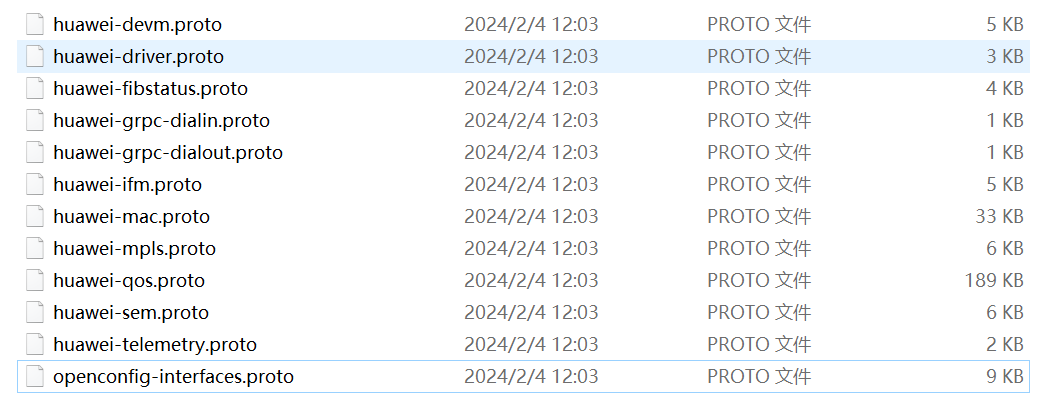
  1. 从官网下载CE12800 proto文件(已准备好,直接从文档链接下载)
    配套文件-华为CE12800-proto文件.zip

解压缩之后需要其中的三个proto文件,每个proto的作用详见课本p 。
三个文件是:

  • huawei-devm.proto

  • huawei-grpc-dialout.proto

  • huawei-telemetry.proto

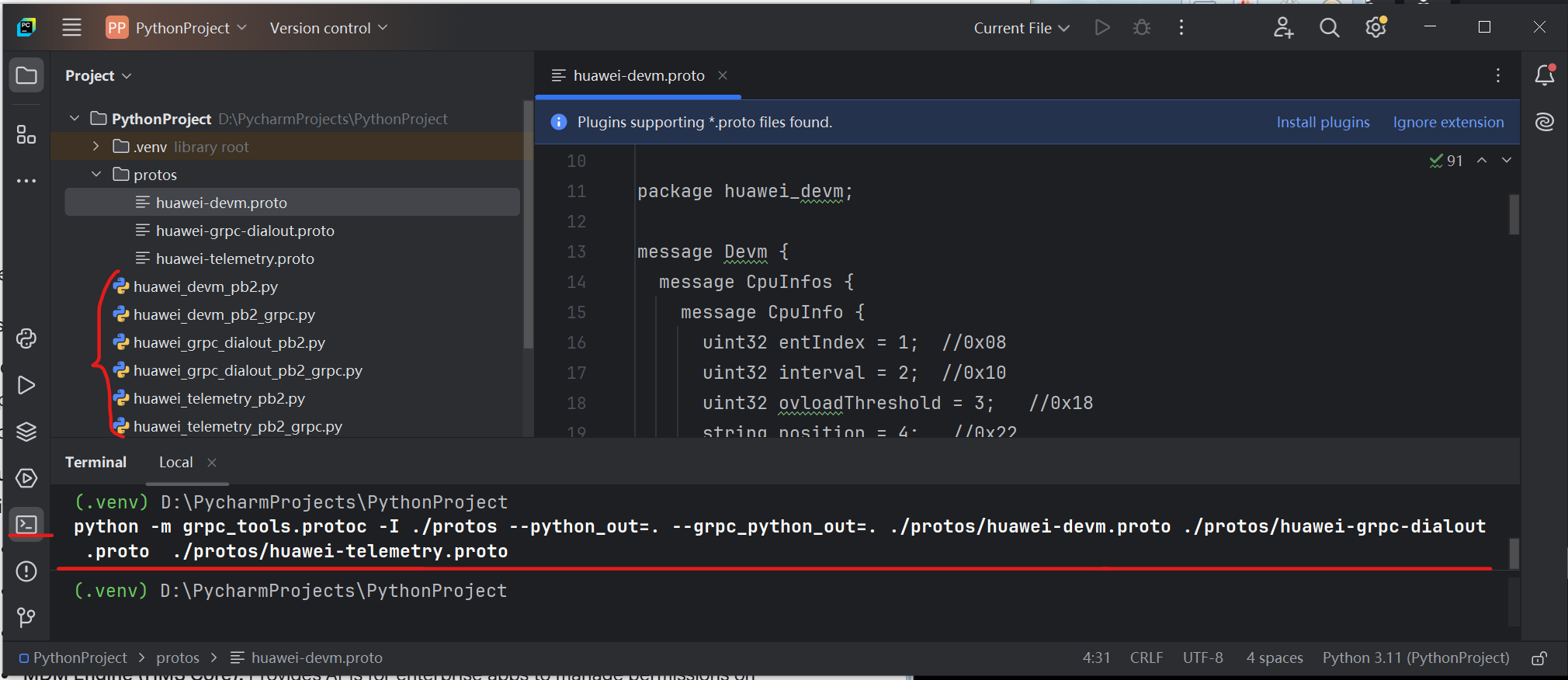
python项目工程下新建子文件夹protos ,把这几个proto文件ctrl+V粘贴进去(Pycharm弹窗提示是否粘贴选确定)。

7 2 proto

  1. 编译proto文件。3个.proto文件最终生成6个.py文件。
    Windows终端下输入命令:(建议使用Pycharm中的终端,因为帮你cd到了项目文件夹下,下面文件中的路径才能保证正确)

python -m grpc_tools.protoc -I ./protos --python_out=. --grpc_python_out=. ./protos/huawei-devm.proto ./protos/huawei-grpc-dialout.proto ./protos/huawei-telemetry.proto
7 2 proto
  1. 创建telemetry_server.py
    注意连接的设备侧地址和端口号与之前命令中的一致。

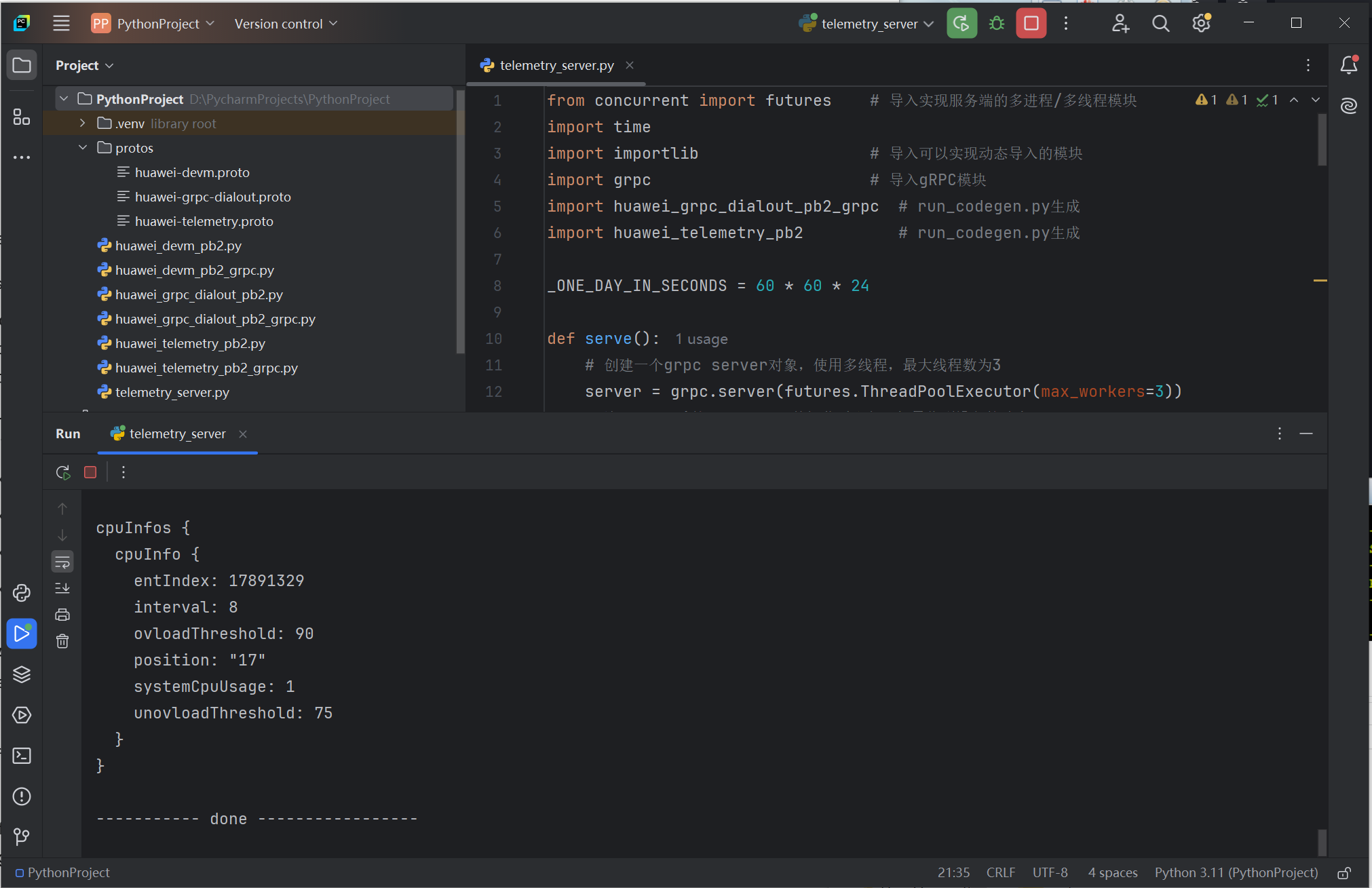
from concurrent import futures # 导入实现服务端的多进程/多线程模块 import time import importlib # 导入可以实现动态导入的模块 import grpc # 导入gRPC模块 import huawei_grpc_dialout_pb2_grpc # run_codegen.py生成 import huawei_telemetry_pb2 # run_codegen.py生成 _ONE_DAY_IN_SECONDS = 60 * 60 * 24 def serve(): # 创建一个grpc server对象,使用多线程,最大线程数为3 server = grpc.server(futures.ThreadPoolExecutor(max_workers=3)) # 注册huawei的telemetry数据监听服务,如果收到设备的消息, # 则创建Telemetry_CPU_MEM_Info实例解码回显消息内容 huawei_grpc_dialout_pb2_grpc.add_gRPCDataserviceServicer_to_server( Telemetry_CPU_MEM_Info(), server) # 设置socket监听端口 server.add_insecure_port('192.168.56.1:10001') # 启动grpc server server.start() # 死循环监听,如果没有收到设备侧发的消息,程序陷入暂停状态 try: while True: time.sleep(_ONE_DAY_IN_SECONDS) except KeyboardInterrupt: server.stop(0) # 创建类继承huawei_grpc_dialout_pb2_grpc中Service方法 class Telemetry_CPU_MEM_Info( huawei_grpc_dialout_pb2_grpc.gRPCDataserviceServicer): def __init__(self): return def dataPublish(self, request_iterator, context): for i in request_iterator: print('############ start ############\n') telemetry_data = huawei_telemetry_pb2.Telemetry.FromString(i.data) # print(telemetry_data) for row_data in telemetry_data.data_gpb.row: print('-----------------') print('The proto path is :' + telemetry_data.proto_path) print('-----------------') module_name = telemetry_data.proto_path.split('.')[0] root_class = telemetry_data.proto_path.split('.')[1] # 动态加载telemetry获取数据的对应模块,本例中为 decode_module = importlib.import_module(module_name + '_pb2') # print(decode_module) # 定义解码方法:getattr获取动态加载的模块中的属性值, # 调用此属性的解码方法FromString decode_func = getattr(decode_module, root_class).FromString print('----------- content is -----------\n') # 将row_data中的content中的内容使用此方法解码,并输出 print(decode_func(row_data.content)) print('----------- done -----------------') if __name__ == '__main__': serve()

数据采样间隔10s,10s后能持续接收到数据为成功🎉。
(返回数据的值并不会变化,因为eNSP中的机器不是物理机,无法返回真实的CPU负载数据。)
(排错,)

7 2

参考

教辅PPT
华为CloudEngine S5700 V600R022C01 配置指南-系统监控(eNSP中的S5700功能不全)
https://support.huawei.com/enterprise/zh/doc/DOC1100098004
https://support.huawei.com/enterprise/zh/doc/EDOC1100290805/5172479f#ZH-CN_TASK_0000001171569233

10 四月 2025